Marshals (Gallery Management Volunteers)
Schedules & shifts
Where do I find my schedule?
Sign in to
TeamWorks with the same name and email you used to register. It is the official source for your assigned days, hole, and shift times. If you cannot sign in, use "Forgot Your Password" or email
presidentscupvolunteers@pgatourhq.com.
TeamWorks is view-only for general volunteers.
Can my shift time change?
Your assigned day and hole should stay the same, but start and end times can shift. Check
TeamWorks near tournament week and again before each shift.
Why might my shift end earlier than scheduled?
The Presidents Cup uses match play, so a match can end before the final holes. Some shifts, most often on the Back Nine, may finish early. Your Hole Captain will tell you when your team is released.
How do I change, drop, or add a shift?
Contact your Hole Captain, committee chair, or lead. Name the shift you cannot work and list every other date and time you can, since options make it much easier to keep the hole staffed. To update availability, uniform size, email, phone, or other profile details, email
presidentscupvolunteers@pgatourhq.com.
What if I will be late or have to miss a shift?
Tell your Hole Captain or lead as early as you can. Early notice gives the team the best chance to move coverage or fill the post.
What if I can no longer volunteer?
Sunday, September 20 training
When and where is our training?
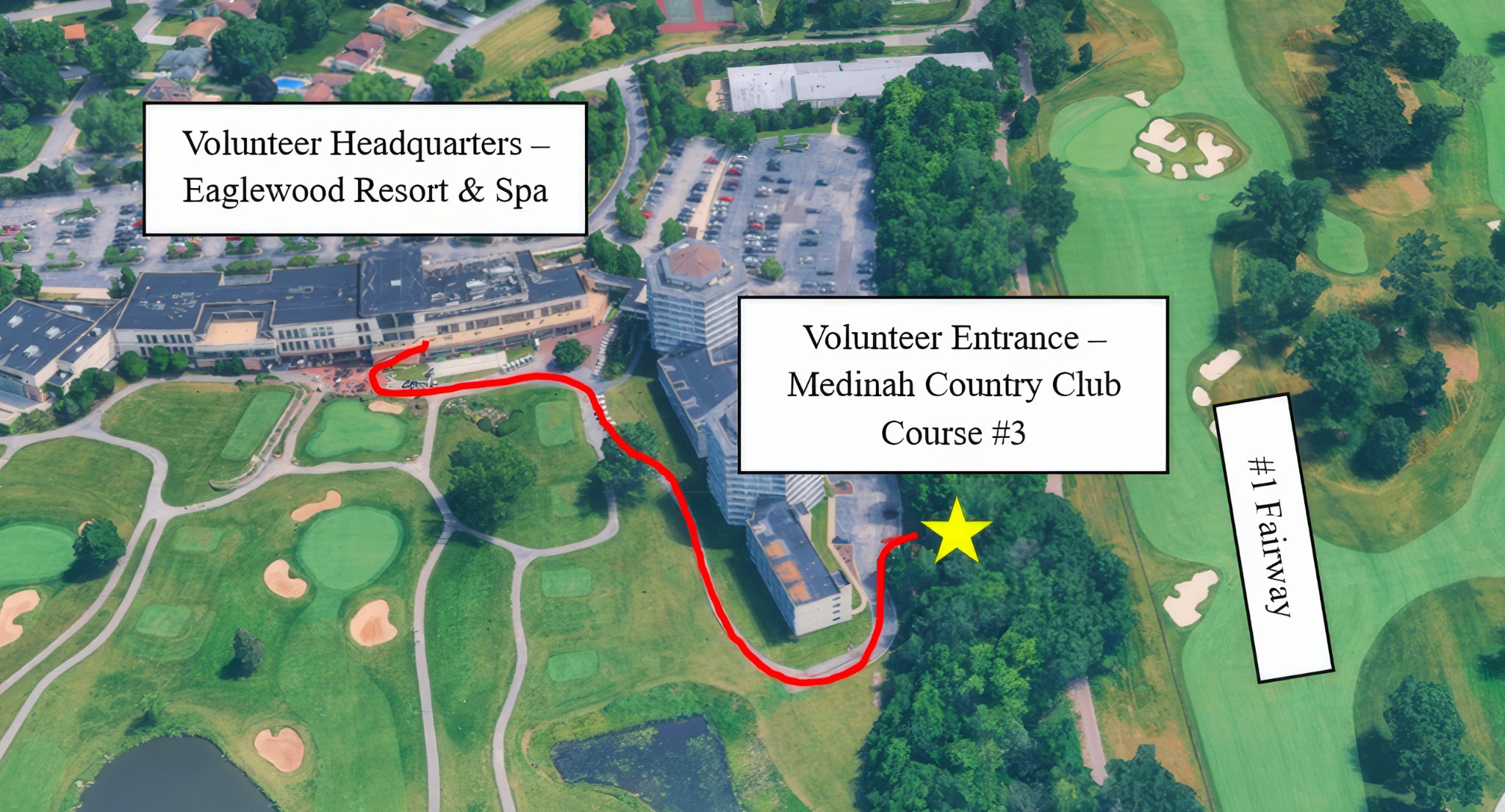
Team training is Sunday, September 20 at Medinah. Back Nine (holes 10–18): training 10:30–11:30 AM, uniform pickup 12:30–2:00 PM. Front Nine (holes 1–9): uniform pickup 10:00 AM–12:30 PM, training 1:00–2:00 PM. Meet your team at the Volunteer Entrance to Course No. 3, then walk to your assigned hole with your Hole Captain to review posts, crossings, rope lines, and key work areas.
What if it rains?
If the rain plan is used, report to the Red Oak Foyer at Eaglewood at your team's normal start time instead of the course entrance. Find your team by your Hole Captain's numbered sign. Bring a rain jacket and umbrella for the walk between parking, shuttles, and training.
How do I get to Sunday training?
Park at Woodfield Mall, Lot 1 and take the shuttle to Eaglewood. The Sunday shuttle runs 6:30 AM–6:00 PM, and the ride takes about 30 minutes. Allow extra time to move between uniform pickup and your training meeting point. Medinah members should use Lake Park High School on Medinah Road for Sunday pickup and shuttle to the course.
What if I cannot attend Sunday training?
You can pick up your uniform on your first scheduled day and get on-course training from your Hole Captain when you arrive. A recorded Volunteer 101 session is also available through the volunteer site.
Uniform & dress
What is in my volunteer package?
Two Fairway & Greene polos, a Fairway & Greene pullover, a volunteer hat, a volunteer pin, your credential and lanyard, and a clear tote bag. You also receive free volunteer parking, one meal voucher per shift, and a 20% off Fan Shop coupon.
What should I wear on shift?
Wear the approved volunteer polo, pullover as needed, hat, credential, and lanyard. For bottoms, wear beige khaki or light-colored pants, shorts, or a skirt. Choose comfortable closed-toe shoes; golf shoes must have soft spikes. Dress for the forecast.
When and where is uniform pickup?
Sunday, September 20 at Eaglewood: Front Nine 10:00 AM–12:30 PM, Back Nine 12:30–2:00 PM. Park at Woodfield Mall and take the shuttle. A friend or family member may pick up your kit during your window if you email the PGA Volunteer Team ahead of time. If you cannot make any pickup time, pick up on your first scheduled shift.
Can I exchange a size or buy extra items?
Size trades and any extra polos or outerwear are handled during tournament week at Volunteer Headquarters, once the PGA has confirmed every volunteer received their ordered items and based on remaining stock.
Do I need a photo credential?
No. Only Hole Captains and approved leadership carry a photo credential. General hole volunteers do not, unless the PGA sends a separate request.
Meals & PGA TOUR Pass
How do meal vouchers work?
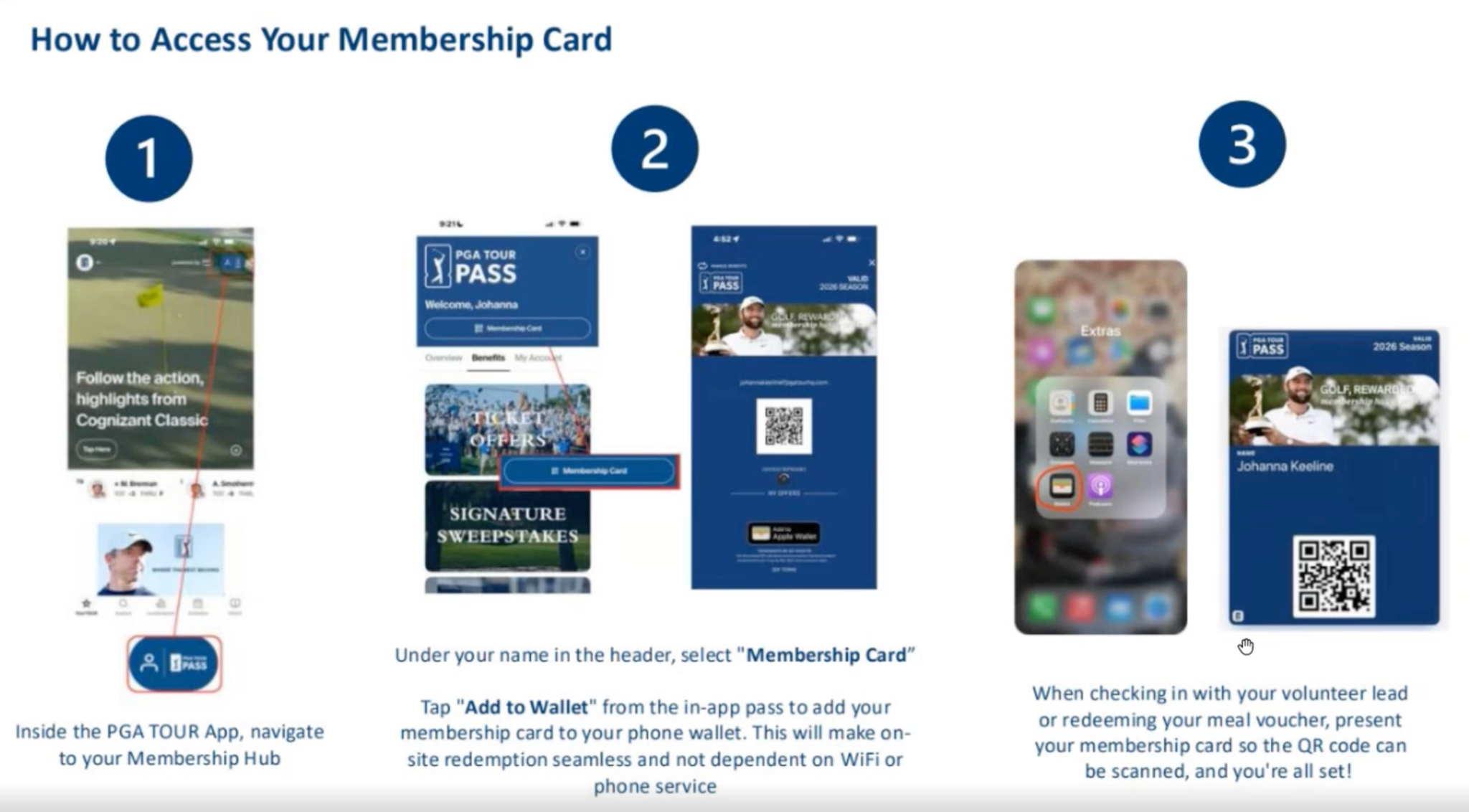
Download the PGA TOUR app and sign in with the same email you used to register, which is also the email linked to your
TeamWorks account. iPhone users can add the pass to Apple Wallet. At check-in each day, show your PGA TOUR Pass QR code to your Hole Captain or lead, who sends a $25 digital meal voucher to your account. It covers one entrée, one side, and one non-alcoholic drink at participating concessions. Working two shifts in a day means two vouchers, one scan per shift. If you do not have a smartphone, tell your Hole Captain before tournament week so a physical voucher can be arranged.
Where else can I get food, drinks, or a break?
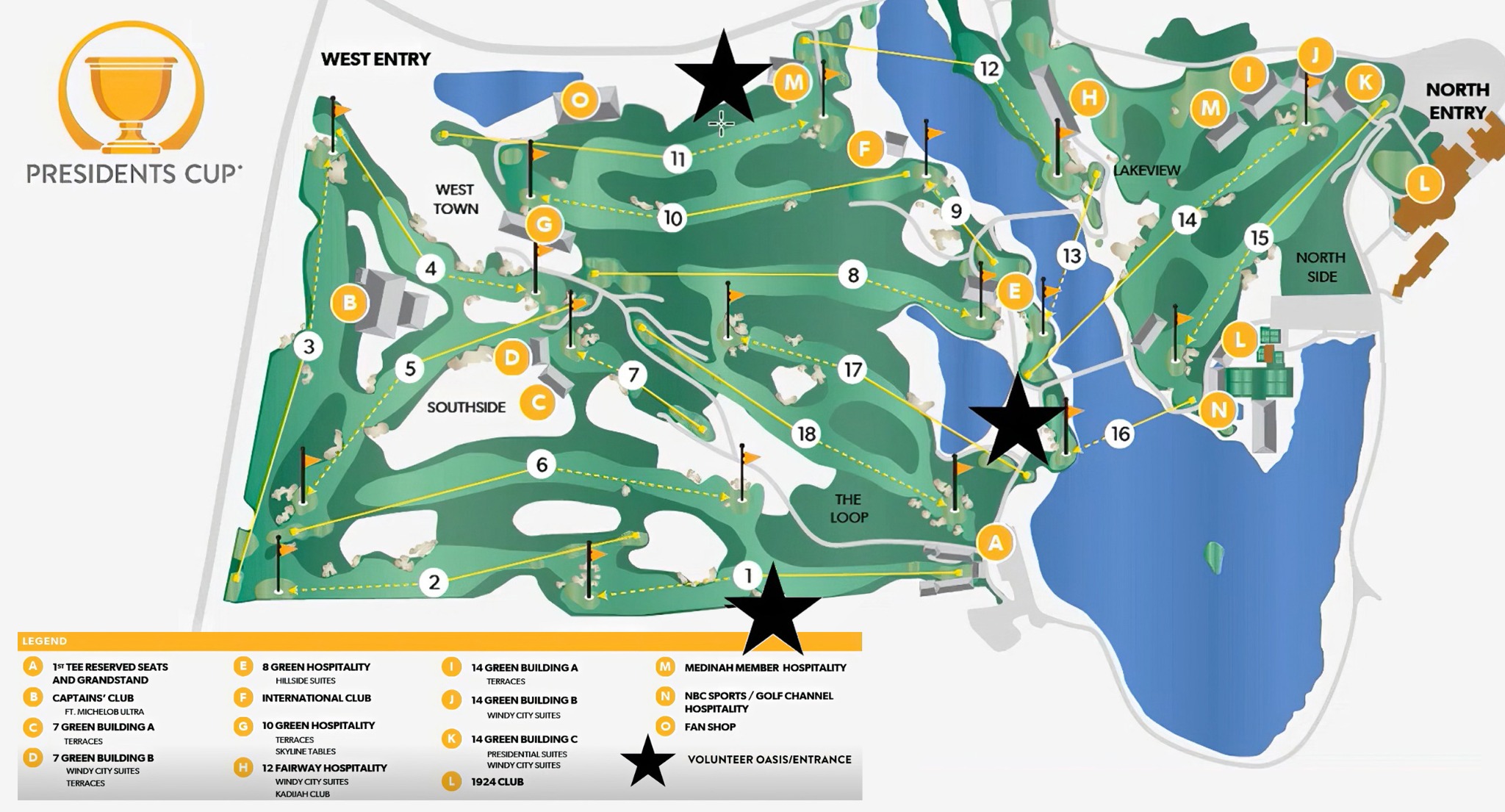
Breakfast is provided at Volunteer Headquarters for morning shifts. Free grab-and-go snacks and water are available near the 11th fairway and the 16th green, and Volunteer Oasis tents offer space to rest. You may also use public seating areas.
Getting there & access
Where do I park?
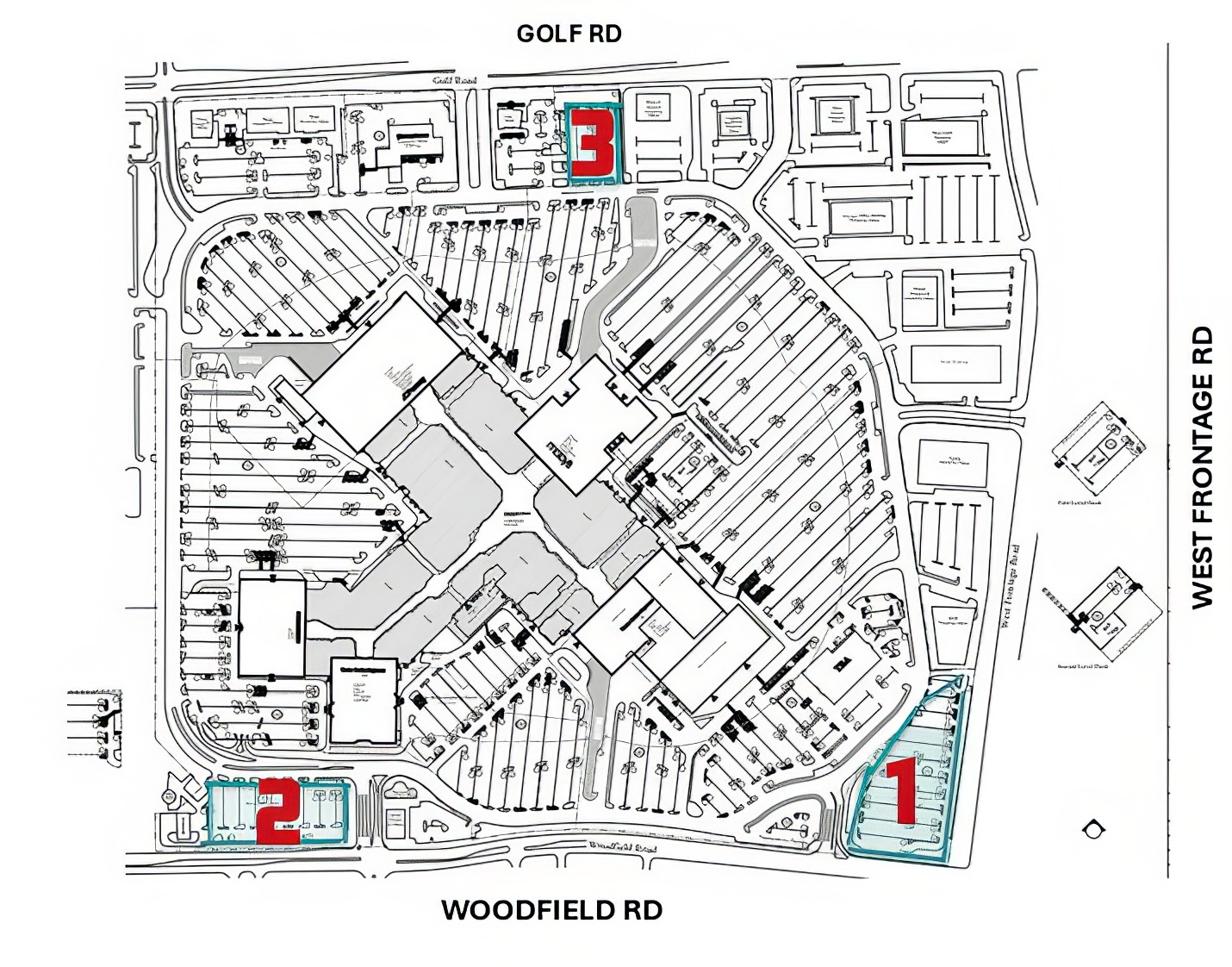
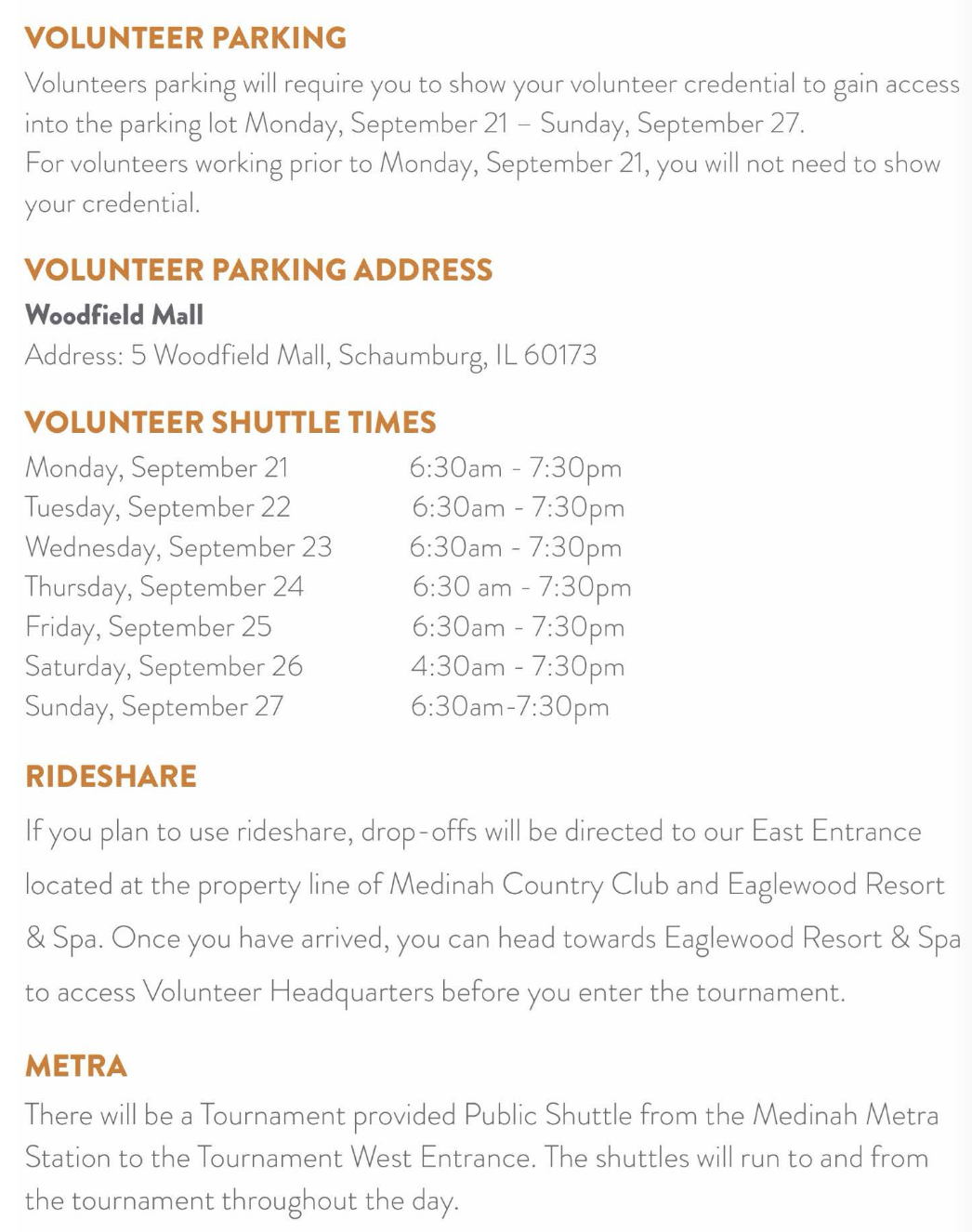
Park free at Woodfield Mall, Lot 1 (5 Woodfield Mall, Schaumburg, IL 60173). When Lot 1 fills, staff and signs direct you to overflow Lots 2 or 3. Take the tournament shuttle from Woodfield Mall to Volunteer Headquarters at Eaglewood; allow about 30 minutes, with buses roughly every 10 minutes. Parking is open September 19–27. Show your volunteer credential September 21–27; a credential is not needed before the 21st.
Are there other ways to arrive?
Rideshare drop-offs go to the East Entrance at the property line of Medinah Country Club and Eaglewood; walk toward Eaglewood to check in at Volunteer Headquarters. By Metra, a public tournament shuttle runs throughout the day between Medinah station and the West Entrance.
Where do I report, and how early?
Volunteer Headquarters at Eaglewood is the main arrival point. From Eaglewood, follow the posted route out the back to the Course No. 3 volunteer entrance near the 11th fairway, then report to your assigned hole. ADA assistance is available. Use the arrival and check-in time in
TeamWorks, and leave extra time for parking, the shuttle, security, and the walk to your hole.
Do I get tickets, and can I come on a day off?
Your credential gives you grounds access all week, including days you are not working. No extra guest tickets are included, and credentials are nontransferable. On a day off, leave the uniform at home and keep your credential out of sight once inside. Guests must buy tickets through the Presidents Cup website.
On the course
What is our team's main job?
Help keep players and guests safe, manage gallery lines and crossings, support quiet during play, and give guests clear, kind direction.
What should I do if a fan becomes abusive or disruptive?
Alert your Hole Captain or lead. Do not argue with or confront the guest. Your captain can report the issue through the event's security text line and request help.
What should I do in a medical emergency?
Alert your Hole Captain, a radio holder, or the nearest event staff member at once. Give the hole number, the part of the hole, the side of the course, what happened, and a brief description of the person who needs help.
Who are the Roving Marshals?
They travel with each match, usually about half a hole ahead of the players, and are marked "Roving" on their credentials.
Who are the Honorary Observers?
Approved guests who walk inside the ropes with a match. They should stay near the rope line and out of the fairway. If you see a problem, tell your Hole Captain or event staff rather than confronting the guest.
Can I stand in front of a sponsor sign?
No. Keep all sponsor signs and branded mesh clear at all times, including while waiting for play to arrive. Broadcast staff watch these areas.
What happens in bad weather?
Follow all event alerts and directions from tournament staff. Do not leave your post without word from your Hole Captain unless there is an urgent safety risk.
Help & contacts
Who do I contact?
For shift, trade, arrival, or hole questions, start with your Hole Captain. For event-wide help,
TeamWorks access, or profile and uniform updates, email
presidentscupvolunteers@pgatourhq.com. For urgent safety or medical needs, alert tournament or emergency staff immediately.
Where are the training guides and resources?
Hole Captains & Leads
Sunday, September 20 training
What do I do before training?
Contact your volunteers to confirm who plans to attend, and share the meeting point, arrival plan, training time, and walking route to the hole.
What are my Sunday captain times?
Pick up your numbered sign at the Violet Room, Eaglewood: Back Nine captains at 10:15 AM, Front Nine captains at 12:45 PM. Then meet your team at the Volunteer Entrance to Course No. 3 for your nine's training window (Back Nine 10:30–11:30 AM, Front Nine 1:00–2:00 PM). If the rain plan is used, gather your team in the Red Oak Foyer at Eaglewood by their numbered sign.
What should I cover with my team?
Lead volunteers to the assigned hole and review posts, crossings, rope lines, player movement, guest flow, rotations, radio use, and basic safety. Make sure each person knows where to report and who to contact during a shift.
On-course leadership
What should I expect during Tuesday and Wednesday practice rounds?
Practice-round tee times can stay fluid, and the scheduled window may run longer than volunteers are actually needed. Prepare your team for late changes, and use the rounds to judge staffing, post needs, crossings, and release times.
Can rope lines change during the week?
Yes. Rope lines may be adjusted after the practice rounds based on player routes, ball flight, guest flow, and safety. You can share feedback, but a suggested change may not be approved.
Can I move rope stakes?
Only once the PGA has shared the approved process for lowering, removing, and replacing stakes. Mallets and marking tees are expected to be available, but do not make changes until that process is confirmed.
When should I release my volunteers?
You decide when the team can leave. Do not release everyone as soon as the last match passes, since some posts and crossings may still need coverage for guests following other matches. Use the practice rounds to judge the right release plan.
Where should my team meet me each day?
You may meet volunteers at Eaglewood or at the assigned hole, whichever works best for your team. Share the exact meeting point before tournament week.
How do I work with Roving Marshals?
Each match is expected to have three or four, traveling about half a hole ahead of the players and marked "Roving" on their credentials. Coordinate with them as the match reaches your hole, and avoid pulling them into a fixed post.
How do I handle Honorary Observers?
They may walk inside the ropes but should stay near the rope line and out of the fairway. If someone is in the wrong area, report it to event staff. Do not confront an Honorary Observer directly.
What do I tell volunteers about sponsor signs?
No one should stand in front of a sponsor sign or branded mesh. Review these areas during training and move posts as needed to keep all sponsor marks clear.
Reporting issues
How do I report a non-emergency fan issue?
Use the security text number printed on the leadership card. Include the issue, exact location, and a photo when it is safe and useful. This line is for concerns such as verbal abuse or distracting conduct, and help is expected within about five to ten minutes.
How do I report a medical emergency?
Use the radio. State the hole number, player's left or right, the part of the hole, the type of incident, and a brief description of the person, including clothing, approximate age, and gender.
Meal vouchers
How do I issue meal vouchers?
Use the LAVA app to scan each volunteer's PGA TOUR Pass at check-in. The scan sends a $25 digital voucher to their PGA TOUR app account. For someone working two shifts, scan twice, one voucher per shift. If a volunteer has no smartphone, collect their name before tournament week and send it through the PGA process for a physical voucher rather than waiting until they arrive.
TeamWorks tools
How do I pull schedule and check-in reports?
In
TeamWorks, go to Home → Reporting Services → Committee Reports. For a full roster, select Schedule, set the date range to September 22–27, include contact information and volunteers without shifts, then export to Excel or PDF. For daily check-in, select Check-In Report and pull one per day, Tuesday through Sunday. Save or print copies for tournament week and use the daily report to mark volunteers present at the hole.
How do I add, move, or remove a shift?
Open Committee Schedule. To remove a shift, right-click it and select Delete. To add one, find the volunteer's row and click-drag across the needed time. If right-click fails on a Mac, retry or use another device. Afterward, review the Volunteer List, confirm the hole, dates, and times, select the affected people, use "Send Schedules," add a short direct note, and ask them to confirm. Do not rely on the
TeamWorks notice alone. Ask the PGA team for help rather than leave a schedule wrong.
My team or schedule page looks blank. What do I check?
Make sure you are in the right committee view. Use Volunteer List, Committee Schedule, or Reporting Services for the task at hand; a blank yellow grid usually means the wrong screen. If data is still missing, send a screenshot to the PGA team or the Gallery Management lead team.
Staffing & roster
A volunteer wants to leave. What do I do?
Send the request to the PGA Volunteer Team and remove the person from your working lineup only after the PGA confirms the change. The PGA team manages any refund and waitlist placement.
A volunteer will not reply or confirm. What next?
Try a direct email, call, or text using the contact data in
TeamWorks. After several attempts, alert the Gallery Management lead team and PGA Volunteer Team so they can check status and decide whether a waitlist volunteer is needed.
A shift is short on volunteers. What do I do?
Email the PGA Volunteer Team and copy your Front Nine or Back Nine lead. State the hole, date, shift time, current headcount, and number of open spots. The PGA may be able to add a waitlist volunteer.
What is the day-of check-in plan?
Volunteers arrive through Volunteer Headquarters and the Eaglewood volunteer entrance, then report to their assigned hole. Use the daily
TeamWorks Check-In Report to mark each person present, and report no-shows to your Front or Back Nine lead.
Positions & credentials
Do we know the exact Marshal posts?
The
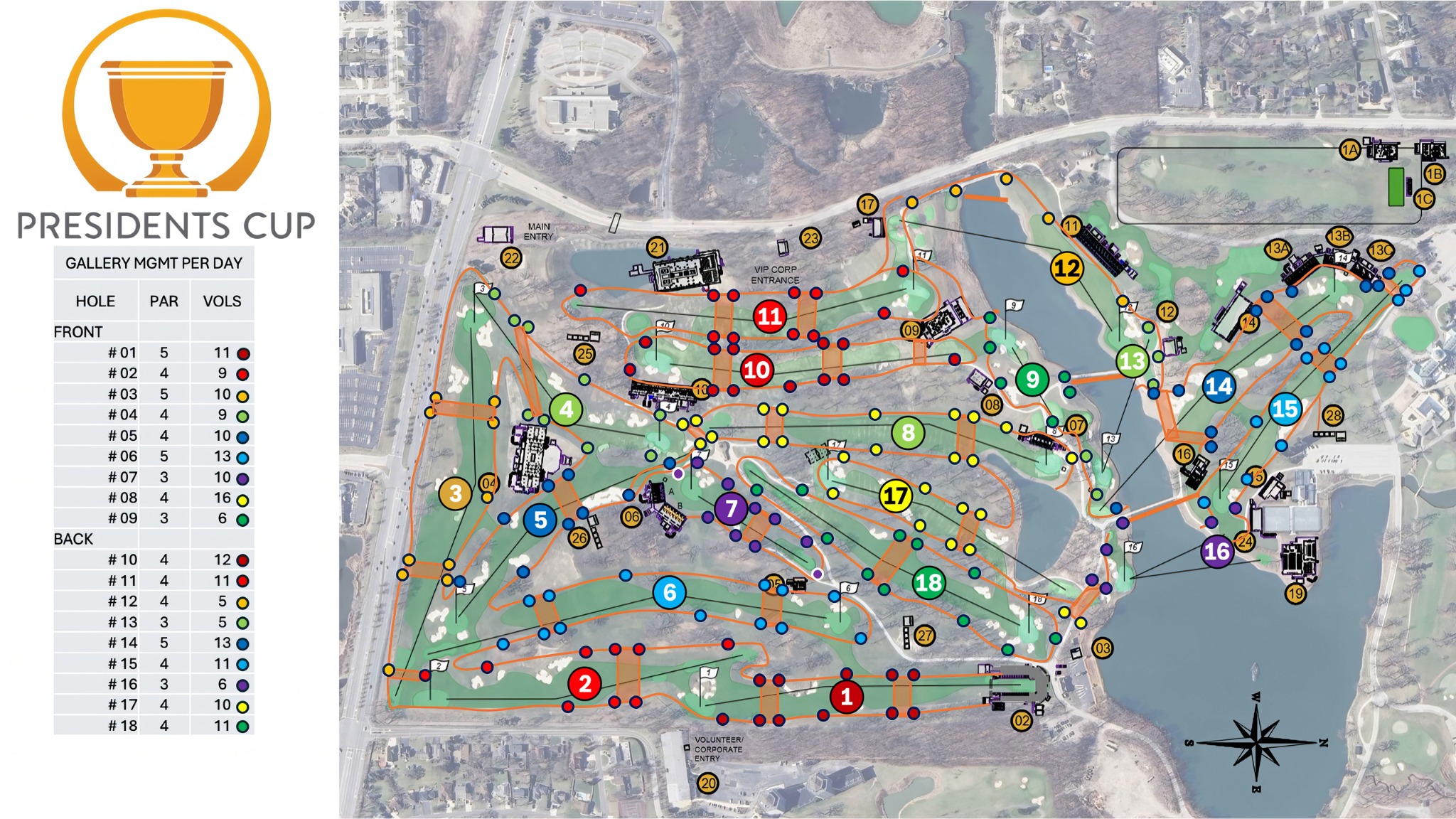
Gallery Management Marshal Course Positions map on this site is the current starting plan. Most holes have more volunteers than fixed posts, so place extras as floaters to fill gaps. Positions may change during the week as Match Committee and Global Golf staff tune coverage.
Can I walk my hole in advance?
Only by arrangement with the PGA team. Do not plan an unscheduled visit; the PGA will help set a time when a walk is needed to plan posts and team flow.
Do I need a photo credential?
Yes. Hole Captains and approved leadership carry a photo credential. If you still need to submit or correct a headshot, contact your Front or Back Nine lead right away.
Contacts
Who are my leads?
Which requests go to the PGA team, and which to me?
PGA Volunteer Team: login help, availability or preference updates, uniform sizes, personal details, withdrawal requests, and alternate uniform pickup. Hole Captain or lead: released-shift changes, workday trades, assigned-hole questions, reporting details, and notice of a late arrival or absence.
What should I keep sending my Marshals?
Review
TeamWorks often and keep shifts current. Contact each volunteer, confirm days and times, and pass along the key points from PGA newsletters, including training, parking, pickup, and entry details that apply to your team. Lead the team contact rather than waiting for every note to come from the main committee, and direct event-wide questions to the PGA inbox.
No answers match that search. Try a shorter term.